




The relaunched ITS Online Store is live with awesome new products!

email
share

Hide Sensitive Passwords “Inside” a Floppy Disk
by The ITS Crew on September 29, 2009

email
share

Floppy Passwords 01Here’s a cool tip we were emailed the other day about storing sensitive information right out in the open.
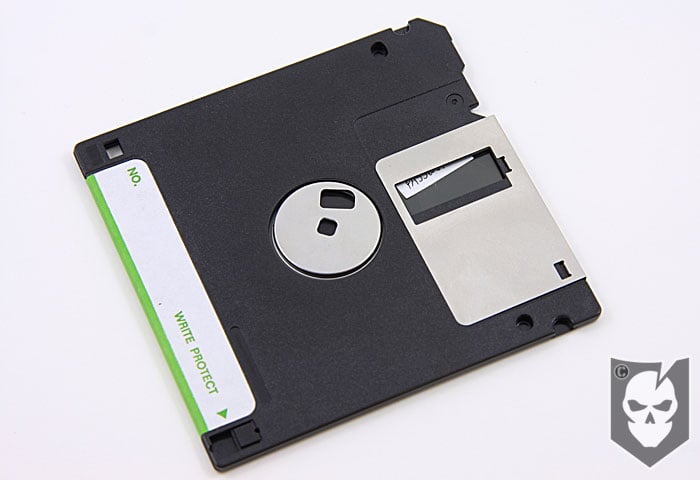
While not a new concept, the idea to store sensitive data on the internal disk of a floppy was something we’d never seen before.

In the article we originally saw on instructables.com, they recommended taking apart the disk, sticking the passwords down with glue, and then putting it back together again.

We’ll, we figured out a simpler way to affix the passwords that doesn’t require taking apart the floppy.

Our Method

Floppy Passwords 03If you simply cut some small rectangles of sticky label, they can be placed at various intervals on the disk as you spin it. Sliding the metal bracket to the side will enable you to reach the internal disk.
You can rotate the internal disk by turning the metal spindle on the rear side of the disk. Once you’ve placed the labels down, simply continue turning the disk to a blank part.

Anyone snooping around would never know where your passwords are hidden. Even if they opened the sliding metal bracket, they’d just see a blank area.

Of course this method has its downfalls too, such as anyone that’s actively trying to gather sensitive information from your home would most likely throw this in a bag, along with any other media you might have on your desk.

We did like the tip in the article about labeling the disk with some misinformation, like “School Essay.”

Does anyone else have any cool hiding spots for sensitive information they’d like to share?

Are you getting more than 14¢ of value per day from ITS Tactical?

Become a Crew Leader!

Please consider joining our Crew Leader Membership and our growing community of supporters.

At ITS Tactical we’re working hard every day to provide different methods, ideas and knowledge that could one day save your life. Instead of simply asking for your support with donations, we’ve developed a membership to allow our readers to support what we do and allow us to give you back something in return.

For less than 14¢ a day you can help contribute directly to our content, and join our growing community of supporters who have directly influenced what we’ve been able to accomplish and where we’re headed.

Click here to learn about all the benefits and Join!

email
share

{ 22 comments… read them below or add oneDiscuss in our Forum }

Pez dispenser with a Thumb drive in the bottom for info ;-)

Reply

Great idea Doc!

Thanks for the comment!

Reply

Doc – That is a very cool idea. Got any pics?

Reply

One of the methods I like to use, while it’s not as readily accessible, is pretty decent too. I take the end off of a highlighter, pull the ink out and then use that for any necessary storage. Some are big enough to fit a small flash drive in as well.

Reply

Great tip!

Reply

Riaan Rossouw September 29, 2009 at 10:26 am
Thumb up Thumb down 0

Use Hide In Picture software to encode a text file into an image and post it to a host of your choice. The chances of anyone firstly finding your vacation pix and then spending heaps of time trying to find encrypted info in them is near zero, but they’ll always be available from any terminal. The software is small enough to download on demand when you need to recover the data.

Reply

Riaan,

Great information! Thanks for the comment!

Reply

Someone once recommended wrapping a bill around the batteries in your flashlight. That way the batteries won’t rattle and you’d have a small stash of emergency cash. You could, of course, replace the money with a piece of paper with the data to be stored written on it. (The assumption, of course, is that you will always carry your flashlight with you, no matter where you go. But hey – who doesn’t?)

Another place to hide your sensitive data would be a small USB drive on your key ring. Dreadfully mundane, perhaps, but effective – most people usually tend to carry their keys with them, too. If storing a larger amount of sensitive data (multiple passwords, etc.) you could even encrypt the drive so you need only remember one master password to gain access to it.

The idea Riaan mentioned, embedding your data into a bunch of images, is a great one too.

The floppy disk method though, that I don’t like so much. Nobody uses floppy disks for mundane purposes any more (Manufacturers have ceased fitting floppy disk drives to their computers years ago!), so an intelligence gatherer is bound to think it is a disk encryption key or something else equally unusual and thus interesting – in other words, worth taking with you or copying. Or they are less intelligent and just see a disk and go “that might be important”. Same outcome, either way. Good thinking on the sticky note method, a very nice execution of the idea. Pity that the premise of hiding sensitive data in an obvious data storage container is kind of flawed to begin with.

Reply

Great additions Tony!

I agree that the method is flawed to begin with, but judging by the comments, the article did its job :)
It got everyone thinking in that mode and we hoped it would.

Regards,
Bryan

Reply

I guess you could say I don’t take a lot of time to hide sensitive information. Because I know most practiced criminals and intelligent types. Can toss a room in under three minutes, looking in all the good hiding places. The picture encryption software is a good idea, another one is a good tamper resistant, encrypted thumb drive like “ironkey” it is what those who have information that is much more dangerous use, example the US military,
Also you can take any good thumb drive and get free encryption software/database software, that is very difficult to crack and will protect you from most identity theft, style threats. I also carry around on a thumb drive software that allows me to erase any information I entered or viewed on a public computer

Reply

Roller77,

Could you tell us what the software is called that you use to erase your tracks on the computer? Thanks!

Reply

Roller77,

Let us know what that software is you mentioned that erases sensitive information. I’ve heard of installing a browser right onto a thumb drive so that when you’re on a computer you just plug in your thumb drive and open the browser on the drive. Then any history etc.. that is gathered is only stored on the thumb drive. Not sure how accurate that info is, I’d have to look into it again.

Thanks for the comment,
Bryan

Reply

misizjackson September 29, 2009 at 10:45 pm
Thumb up Thumb down 0

I’m stunned actually. I can’t believe anyone really has floppy’s hanging around. Uh hum, what kinda hard/peripheral drive do I need to run them?

I suggest a USB Flash Drive. You can even get one with Swarvoski Crystals to hang around your neck.

Reply

There’s nothing tactical about Swarvoski Crystals LOL!!

Thanks for the comment,
Bryan

Reply

misizjackson September 30, 2009 at 8:09 pm
Thumb up Thumb down 0

Unless it’s one of their scopes, right. :)

Reply

It’s been a long time since I’ve even seen a floppy disk.

A colleague keeps his passwords to numbers and stores them in his address book, formatted to look like telephone numbers. I think that’s a decent way of hiding in plain sight.

Reply

James, the address book format is a great way, thanks for the tip!

Reply

krazykiddjoe October 8, 2009 at 11:02 am
Thumb up Thumb down 0

I’ve got certain passwords for work that have to be changed every 60 days. They can’t repeat for 6 months. It has to have one letter one special character and numbers…. I use the date for the numbers two digit month and year… So I always know what the password… I’ve gotten other to try this as well and it simplify’s running this password… for others I use the address book route and the usb drive. I am interested in the photo thing as well tho.

KKJ-Out

Reply

Mozilla has a portable version of Firefox, which is small enough to put in a thumb drive. You can then run the browser on any computer from the drive itself, leaving no info behind whatsoever. Great for checking your account balances and other private matters away from home/laptop.

Reply

It's a good idea to protect your stuff from people who are in a rush and likely to overlook the fact that the highlighter has no tip :P

While not as spacious as a highlighter, I find large cap-style pens work well, because once you remove the tip you can trim it and then secure it once again in the pen using hot glue so it appears as simply a non-working pen. Also unlike with most highlighters you can unscrew a pen in seconds for easy access to whatever is inside.

Another two nifty tricks I found on instructables are hollowing out an eraser to store a flash drive in, and using an empty lighter to store keys, money, etc.
http://www.instructables.com/id/Pink-Eraser-USB…
http://www.instructables.com/id/How-To-Make-A-%…

Reply

There is a great way to stay safe on public computers and keep your USB drive secure. Use Trucrypt Portable to create an encrypted container on you USB drive and then install portable apps on the encrypted container. Using Mozilla with Sync enabled and/or LastPass you will be able to have easy access to all of you bookmarks, tabs and passwords without worry of being compromised. Lastpass even helps avoid key logging by entering your credentials without the having to key them in manually. In addition the Truecrypt container also protects any documents that you have stored in the container. Hope that this helps.

http://www.portableapps.com
http://www.lastpass.com
http://www.truecrypt.org
http://www.makeuseof.com/tag/encrypt-your-usb-stick-with-truecrypt-60/

TJ

Reply

« Previous post

Next post »